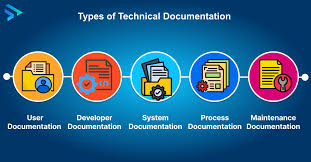
In today’s complex technological landscape, technical documentation forms the essential bridge between sophisticated products and the people who use, maintain, and develop them. Far more than just a user manual, it is a comprehensive system of communication that spans the entire lifecycle of a product—from the initial idea in a developer’s mind to the final act of safely disposing of a physical device. It encompasses user guides, API references, project plans, internal wikis, and everything in between. When executed well, it empowers users, accelerates development, streamlines operations, and protects organizations from costly errors. When neglected, it leads to frustrated customers, inefficient teams, and, as evidenced by the $125 million loss of the Mars Climate Orbiter, potentially catastrophic failures. This ultimate guide will unpack what technical documentation truly is, explore its many forms, reveal the best tools and practices for creating it, and demonstrate how it acts as the cornerstone of knowledge, efficiency, and success for any technology-driven organization.
Understanding Technical Documentation
At its core, technical documentation is any form of writing or media designed to explain complex information in a clear, structured, and accessible way. Its fundamental purpose is to make a product, system, or process usable. It answers the critical “how,” “what,” “when,” and “why” for its intended audience, whether that’s an end-user trying to assemble furniture, a developer integrating an API, or a service technician performing maintenance. Every time you follow a recipe, read a map, or assemble flat-pack furniture, you are interacting with a form of technical documentation.
The scope of modern technical documentation is vast and varied. It is no longer confined to dense, printed manuals. Today, it includes interactive online knowledge bases, video tutorials, step-by-step screen guides, embedded help within software, and even augmented reality applications that overlay instructions onto physical equipment. A key principle in creating effective documentation is the clear distinction between different audience types. Broadly, documentation is categorized as either process-focused or user-focused. Process documents guide internal workflows, development, and maintenance, often containing industry-specific jargon for professionals like engineers and project managers. In contrast, user documents are designed for customers and end-users, prioritizing plain language, step-by-step instructions, and clear explanations to empower them to use the product successfully.
A Detailed Look at Different Types of Technical Documentation
To truly grasp the ecosystem of technical documentation, it’s helpful to break it down by its primary purpose and audience. The following table categorizes the major types, highlighting their core objectives and key examples.
Table: Categories and Types of Technical Documentation
| Category | Primary Audience | Core Purpose | Key Examples |
|---|---|---|---|
| Product Documentation | End-Users, Customers | To enable the effective use and understanding of a product. | User Guides, Troubleshooting Guides, Knowledge Bases, Release Notes. |
| Process Documentation | Internal Teams & Developers | To standardize internal workflows, development, and project management. | Project Plans, API Documentation, Code Documentation, Internal Wikis. |
| Sales & Marketing Documentation | Prospects, Clients, Stakeholders | To communicate market fit, technical value, and secure business. | Market Requirements Documents (MRD), White Papers, Technical Case Studies. |
Product Documentation: Empowering the End-User
This is the category most people think of when they hear “documentation.” Its sole aim is to help the customer achieve their goals with a product. A user guide or manual is the classic example, providing step-by-step instructions tailored to the user’s technical level, often enhanced with screenshots or diagrams. Troubleshooting guides and knowledge base articles are crucial for customer support, allowing users to solve common problems independently, which significantly reduces support ticket volume. Release notes are another vital component, accompanying software updates to clearly communicate new features, enhancements, and bug fixes, keeping users informed and engaged.
Process Documentation: The Engine of Development
This documentation is the internal blueprint for building and maintaining a product. It ensures consistency, knowledge transfer, and continuity within teams. API documentation is essential for developers, detailing how to interact with an application’s programming interface, including endpoints, methods, parameters, and code samples. Similarly, SDK (Software Development Kit) documentation provides the tools and instructions for building applications on a specific platform. Internally, project plans define goals and map out the steps to completion, while comprehensive code documentation (like inline comments) explains the logic and purpose within the source code itself, making it maintainable by others.
Sales, Marketing, and Requirements Documentation
This type bridges the gap between technical capabilities and business value. A Market Requirements Document (MRD) outlines customer needs, market analysis, and competitive landscape, guiding the product development strategy. White papers are in-depth, authoritative reports that educate prospects on a complex issue and position a company’s product as a leading solution, based on expertise rather than direct sales pitches. User Requirements Documents (URD) specify the exact features and functionalities expected from the software, often forming part of a contractual agreement to ensure developer and client alignment.
Principles and Best Practices for Creating Outstanding Documentation
Creating effective technical documentation is both an art and a science. It requires more than just dumping information; it demands a strategic approach centered on the audience. The first and most important rule is to know your target audience intimately. Are you writing for novice end-users, seasoned system administrators, or software developers? The depth of detail, choice of language, and even the format will vary dramatically. For developers, include code samples and technical specs; for end-users, focus on clear outcomes and simple, actionable steps.
Clarity and user-friendly structure are non-negotiable. Organize content with clear headings, a logical table of contents, and an intuitive information architecture. Break down complex procedures into numbered steps and use active voice. Adopting a documentation style guide is a best practice that promotes consistency in tone, terminology, and structure across all your documents, which is especially critical for large teams or organizations. Furthermore, incorporating visuals like screenshots, diagrams, and video tutorials can dramatically enhance understanding. A short video demonstrating a workflow is often more effective than a thousand words of text.
“Understanding the distinction between process and user documentation is crucial. One guides internal workflows; the other empowers end-users. Both are essential, but they serve different purposes.” — Elmira Abbyasova, Head of Content at ClickHelp
Finally, documentation is not a “set it and forget it” task. It is a living resource that must evolve with the product. Updating documentation regularly is essential to prevent user confusion and frustration caused by outdated information. Implement version control practices, often using tools like Git, to track changes and manage different versions effectively. Encouraging collaborative documentation, where multiple subject matter experts can contribute and review, improves accuracy and catches errors early. A dedicated troubleshooting and FAQ section is also a best practice that empowers users to help themselves, directly reducing the load on your support team.
Essential Tools for Modern Technical Documentation
Choosing the right software is pivotal for creating, managing, and maintaining high-quality documentation efficiently. The modern landscape offers tools tailored to every need, from collaborative writing to developer-focused API docs.
Collaborative Writing & Knowledge Base Platforms: Tools like Confluence serve as powerful company wikis, offering WYSIWYG editors, templates, and seamless integration with other project management tools like Jira. ProProfs Knowledge Base and similar platforms are designed specifically for creating polished, public-facing help sites and internal knowledge bases with features like advanced analytics and role-based permissions.
Developer-Focused & API Tools: GitHub is ubiquitous for hosting code and, with its built-in wikis and robust Markdown support, is a natural choice for documentation that lives alongside the codebase. For API documentation, Swagger UI is an industry standard that can automatically generate interactive documentation from code annotations, allowing developers to test endpoints directly in the browser.
Help Authoring Tools (HATs): For producing formal, multi-format documentation like user manuals, Adobe RoboHelp and MadCap Flare are leading solutions. They support single-source publishing (creating PDF, HTML, and other formats from one document), conditional content, and are built for large, complex documentation projects.
Visual & Specialized Tools: Scribe automates the creation of visual step-by-step guides by capturing your screen as you perform a task, instantly generating an annotated tutorial. For integrating video, Loom allows teams to easily record screen captures and video messages to explain features, demonstrate workflows, or provide personalized support, making documentation more engaging.
Optimizing Technical Documentation for Search (SEO)
In a world where users’ first instinct is to search Google for an answer, making your technical documentation discoverable is critical. The goal of documentation SEO is not to game search engines but to make your helpful content easily found by users who need it. Start with the basics: use descriptive, keyword-rich titles in HTML <title> tags and ensure your URLs are clear and readable (e.g., /docs/installation-guide instead of /docs/page?id=5473).
Technical structure is vital for SEO. Avoid unlinked “orphan” pages, as search engine crawlers cannot discover pages that aren’t linked from elsewhere on your site. Use descriptive anchor text for your internal links. Ensure all important content is in crawlable text, not hidden within images or videos; use alt text for images to describe their content. Implementing a sitemap.xml file helps search engines understand your site’s structure, and a robots.txt file gives you control over what should or shouldn’t be crawled.
Most importantly, create high-quality, user-focused content. Search engines prioritize content that is original, comprehensive, well-written, and genuinely helpful. Use tools like Google Search Console to monitor your documentation’s performance in search results, identify crawl errors, and see what queries users are typing to find your pages. This feedback is invaluable for iterating and improving your content to better meet user needs.
The Human Element: Technical Writers and the Creation Process
Behind every great piece of technical documentation is a skilled technical writer. These professionals are the translators who bridge the gap between complex technical subject matter and the end-user’s need for clear, actionable information. Their role extends far beyond writing; it involves researching, information design, interviewing subject matter experts (SMEs), and managing content within sophisticated systems.
The creation process is methodical. It begins with in-depth research, gathering information from prototypes, developer notes, and interviews with SMEs. Next, writers develop an information concept, planning what to communicate to which audience and in what depth. The actual writing phase is followed by a rigorous review and approval process, typically involving both an editorial review for clarity and a technical review by a product expert for accuracy. Finally, the documentation is published, often in multiple formats and languages.
Common challenges include intense time pressure, as documentation timelines are often squeezed by product development cycles, and managing the complexity of product variants and customizations. To ensure quality, many organizations employ terminology management to enforce consistent use of terms and controlled language principles that make text more predictable, comprehensible, and easier to translate.
Conclusion
Technical documentation is far more than a mandatory deliverable or a simple set of instructions. It is a strategic asset and the backbone of effective product communication. From empowering a customer to successfully use a new tool, to enabling a developer to build a powerful integration, to ensuring an organization’s operational knowledge is preserved and scalable, its impact is profound. Great documentation reduces support costs, accelerates onboarding, mitigates risk, and enhances the overall user experience. By understanding its different forms, adhering to audience-centric best practices, leveraging the right modern tools, and investing in skilled technical writers, organizations can transform their technical documentation from an afterthought into a core component of their product’s success and their company’s operational excellence.
Frequently Asked Questions (FAQ)
What exactly is considered a technical document?
A technical document is any written material or digital content designed to explain complex information clearly and concisely to help a specific audience understand or do something. This includes everyday items like furniture assembly instructions, as well as specialized materials like software API guides, internal project plans, and hardware repair manuals. If it explains how to use something, how something works, or the features and methods behind a product or process, it’s likely a form of technical documentation.
What is the main difference between user documentation and developer documentation?
The core difference lies in the target audience and purpose. User documentation (like manuals and FAQs) is designed for end-users or customers. It focuses on tasks and outcomes, uses minimal jargon, and aims to help users achieve their goals with the product. Developer documentation (like API docs and code comments) is for software engineers and technical staff. It contains technical specifications, code samples, and architectural details necessary to build, integrate with, or maintain a system.
How often should technical documentation be updated?
Technical documentation should be treated as a living resource and updated continuously to align with the product. A best practice is to integrate documentation updates into the development lifecycle itself. Documentation should be reviewed and revised with every significant product release, update, or change in functionality. Outdated documentation is a major source of user frustration and support issues, so establishing a regular review cycle is essential for maintaining its value and accuracy.
Why is SEO important for documentation, and how do I start?
SEO (Search Engine Optimization) is crucial for documentation because when users encounter a problem, their first action is often to search online. If your official technical documentation ranks well, users find accurate answers quickly, reducing support tickets and improving satisfaction. To start, focus on creating high-quality, user-focused content with descriptive page titles and URLs. Ensure your documentation site has a clear structure, uses relevant keywords naturally, and provides a good user experience on mobile devices.
What skills are most important for a technical writer?
An effective technical writer needs a blend of skills. Foremost is the ability to communicate complex ideas with clarity and simplicity for a specific audience. They must be adept at research and interviewing subject matter experts to extract accurate information. Strong information design and organizational skills are needed to structure content logically. Familiarity with documentation tools and platforms (like help authoring tools or Markdown) is increasingly important, as is a foundational understanding of the technical domain they are writing about.